LinearMouse Overview
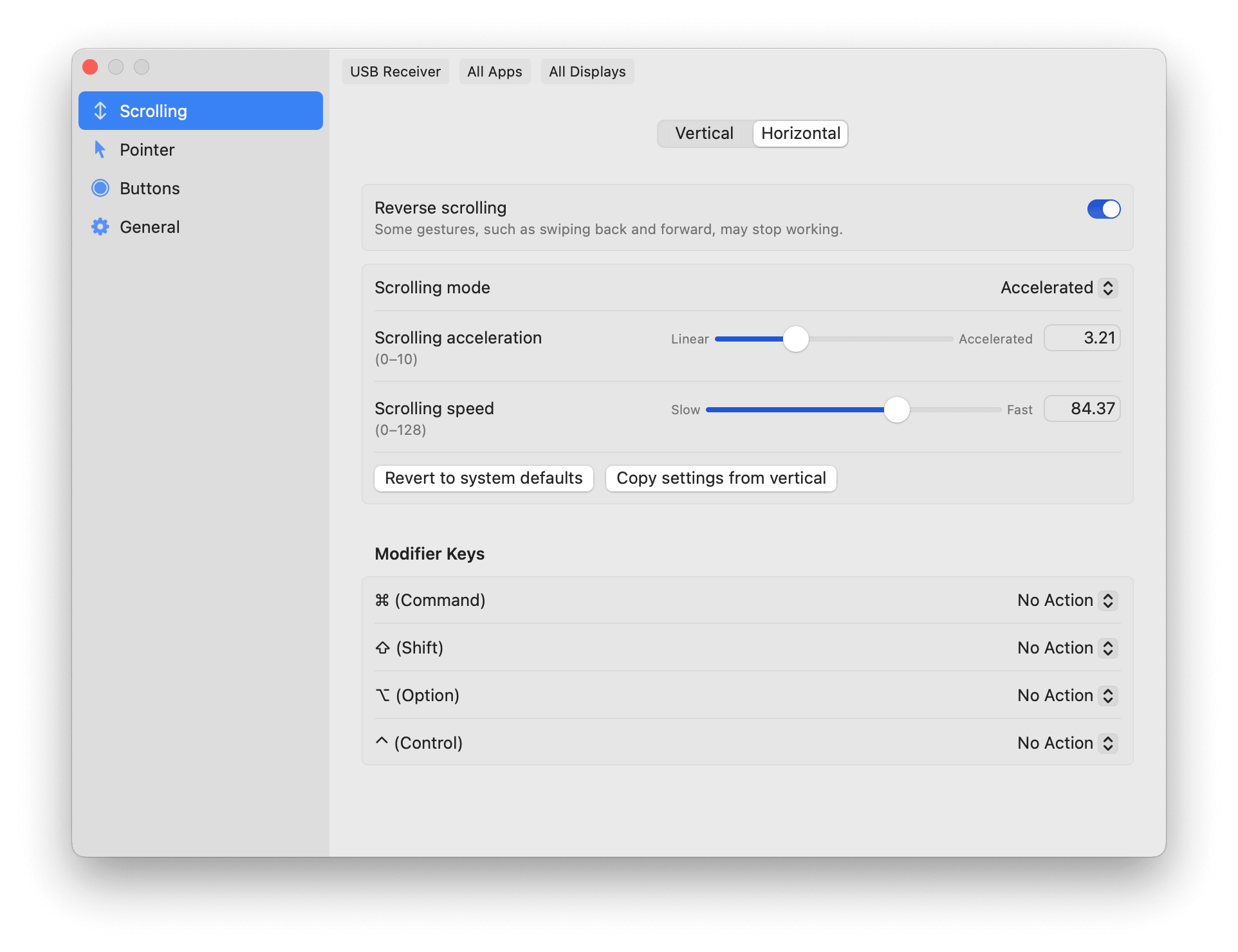
LinearMouse for Mac is a free, open-source utility that gives you control over mouse and trackpad behavior macOS doesn't expose on its own. It lets you reverse scrolling direction for a mouse while keeping natural scrolling on your trackpad, since both can be set independently. Pointer acceleration and sensitivity can be fine-tuned separately, or turned off entirely for steady, predictable movement. App Profiles let different apps or displays use their own settings automatically. LinearMouse also fixes a common annoyance: side mouse buttons that don't register properly for back and forward navigation in apps like Safari and Xcode. It stays lightweight and runs quietly in the background once configured.
Why Choose LinearMouse for Mac
macOS gives you very little control over how a mouse actually feels. Tracking Speed in System Settings is the only real option, and it doesn't behave consistently across every device. LinearMouse replaces that with direct control over acceleration and sensitivity, including the option to turn acceleration off completely for a flat, predictable pointer curve.
Its Logitech support has grown especially deep. Recent updates added hardware DPI control, high-resolution scroll wheel support, gesture button handling, and even battery monitoring for Logitech Bolt receivers, all without needing Logitech's own software installed. If your mouse lacks a smooth scroll wheel, LinearMouse's linear scrolling mode also removes acceleration from scrolling itself, giving you discrete, predictable steps instead.
Key Features
- Reverse scrolling direction per device, keeping trackpads natural while flipping mice
- Linear scrolling mode for predictable, non-accelerated scroll steps
- Universal back and forward button support, fixing issues in apps like Safari and Xcode
- Independent cursor acceleration and sensitivity controls
- App Profiles for automatic per-app or per-display settings
- Modifier key support for changing scroll speed or direction on the fly
- Deep Logitech support, including hardware DPI and Bolt receiver battery monitoring
- Menu bar visibility mode for quick access to settings
- Pointer location reveal shortcut for locating your cursor instantly
- Config hot-reload, so changes apply without restarting the app
What's New in 0.11.4 Version
LinearMouse 0.11.4 continues its heavy focus on Logitech compatibility. Recent changes include:
- Fixed Logitech startup quality-of-service inversions
- Fixed Logitech DPI settings not restoring correctly after a device reconnects
- Fixed Logitech DPI configuration issues over Bluetooth
- Added support for modifier shortcuts on non-Latin keyboard layouts
- The previous 0.11.3 release added the bulk of the current Logitech feature set, including hardware DPI support, high-resolution scroll wheel support, and Bolt receiver battery monitoring, along with several scrolling and stability fixes.
Supported macOS Versions
LinearMouse requires macOS 10.15 or later and runs natively on both Intel and Apple Silicon Macs. It stays extremely lightweight, so it runs comfortably in the background without a noticeable impact on system performance.
How to Install LinearMouse on macOS?
Setting up LinearMouse on your Mac takes just a few steps.
- Download the latest version of LinearMouse for Mac.
- Open the downloaded disk image (.dmg) file.
- Drag the LinearMouse icon into your Applications folder.
- Launch LinearMouse from your Applications folder.
- Grant any accessibility permissions macOS requests on first launch.
- Once installed, you can start customizing your mouse and trackpad settings right away.
How to Use LinearMouse Mac?
- Open LinearMouse and select your connected mouse or trackpad from the device list.
- Adjust scrolling direction and acceleration for that specific device.
- Fine-tune cursor speed and sensitivity, or turn acceleration off entirely.
- Set up App Profiles if you want different settings for specific apps.
- Remap buttons or modifier keys under Button Actions if needed.
- Changes apply immediately, so you can test settings as you adjust them.
Final Verdict
LinearMouse fixes a genuine gap in macOS: real, granular control over how a mouse and trackpad actually behave, rather than the limited Tracking Speed slider Apple provides. Its growing Logitech-specific support stands out, adding hardware features most users would otherwise need separate manufacturer software to access. For a free, open-source utility, it covers an unusual amount of ground, from basic scroll reversal to detailed per-device tuning.
Download LinearMouse for Mac Latest Version
Ready to take real control over your mouse and trackpad on your Mac?
Download LinearMouse for Mac to customize scrolling direction, pointer speed, and button actions for any device you connect. Whether you're fixing an unreliable back button in Safari, tuning a Logitech mouse without extra software, or just want scrolling that feels right, LinearMouse gives you the controls macOS leaves out.